

Genshin Impact Luna V (6.4) is scheduled to launch worldwide on February 25, 2026, after its maintenance update starts at 3:30 AM IST on Wednesday, February 25, 2026. This update will bring back players to Mondstadt, where everything began, and they are likely to explore the story behind the Knight of Boreas and the activities of the Knights of Favonius.
Alongside new story content, the patch will introduce Varka as a playable character. HoYoverse has also enabled preload across PC, mobile, and consoles.
Here is a full breakdown of release timing, maintenance windows, and download requirements.
Maintenance Schedule, Global Release Date and Regional Timings
As per the speculations in the community, Version 6.4 will go live first on North American servers at local time of 8:00 PM on February 24, 2026. After that, it will be live on February 25, 2026, at 11:00 AM local time on Mainland China servers once the maintenance update concludes, which is speculated to last approximately five hours.
During this period, login access will be unavailable and all active sessions will close automatically. As standard compensation, The publisher HoYoverse will distribute 300 Primogems to players who have reached Adventure Rank 5 or higher before the shutdown. The reward will be delivered through the in game mailbox once the update goes live. Players must claim the mail within 30 days, as it will expire afterward.
Key regional release timings:
- Eastern Daylight Time (EDT): 11:00 PM on February 24
- Central European Time (CET): 5:00 AM on February 25
- China Standard Time (CST): 11:00 AM on February 25
- Indian Standard Time (IST): 8:30 AM on February 25
- Japan Standard Time (JST): 12:00 PM on February 25
- Australia Eastern Standard Time (AEST): 1:00 PM on February 25
- New Zealand Standard Time (NZST): 3:00 PM on February 25
As we mentioned earlier, this new update will add Varka as an all new playable 5 star Anemo DPS character. He is known in the lore as the Grand Master of the Knights of Favonius, a title referenced multiple times in earlier story chapters.
Preload Size and Installation Guide
The preload for Version 6.4 is already available, allowing players to download most of the patch files before release. Installing the files will reduce waiting time once servers reopen.
Approximate pre-installation sizes are:
- PC: 6 GB
- Android and iOS: 2 GB
Additional storage may be required depending on installed voice-over language packs.
PC users can access the download through the HoYoPlay launcher by selecting the pre-install option beside the Start button.
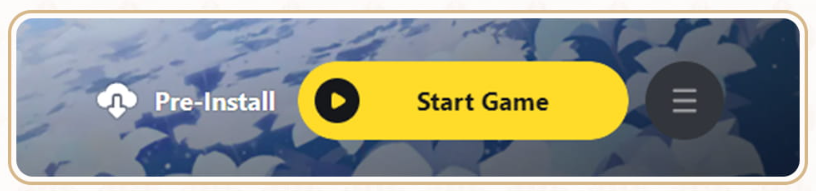
Image Via HoYoVerse
On Android and iOS, the preload option appears on the login screen before entering the game.
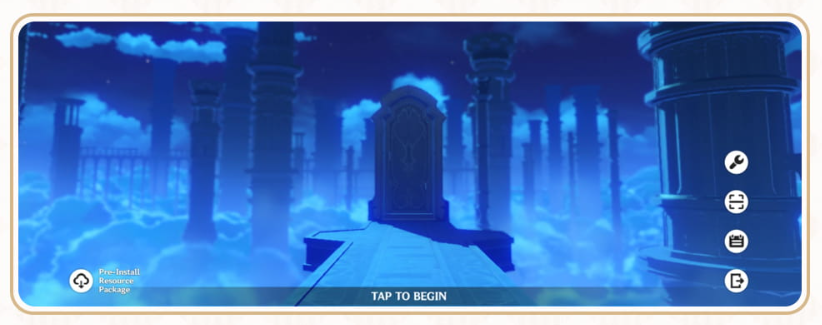
Image Via HoYoVerse
On the PlayStation 5, after launching the game, the device will automatically initiate the pre-installation, but on the Xbox Series X or Series S, users have to pre-install the update by selecting “Check for updates” from their system menu.