
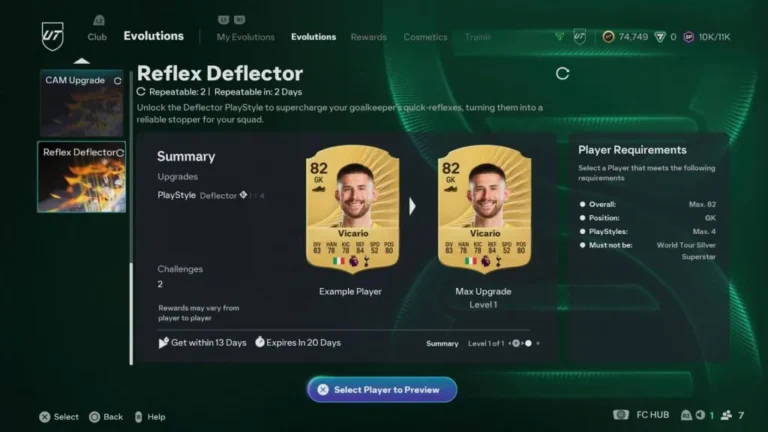
Ultimate Team in EA Sports FC 26 gives you many ways to improve your squad, but Evolutions are one of the most important systems to understand. Evolutions let you upgrade a specific player card by playing matches and completing objectives. You do not rely on pack luck. You choose the player, you do the work, and the card improves.
This guide explains exactly how Evolutions work, where to find them, how to upgrade players, and what you should be careful about when using them.
How Do Evolutions Work in Ultimate Team for EA Sports FC 26
Evolutions are upgrade paths for player cards. The moment you apply an Evolution to a card, that card can acquire improved stats, PlayStyles, extra positions, and a higher overall rating. This process of upgrades will occur in stages rather than being done all at once.
As soon as the Evolution process is initiated, the card becomes permanently non-tradeable. You have to perform objectives to release each upgrade tier. If you quit in between, the card will remain at the last tier completed.
What Evolutions Are and Why They Matter
Evolutions give you the power over the player development. You could transform a low-rated bronze or silver card into a strong starting player, or stir a decent gold card to a much more extended level.
This mechanism is significant for the following reasons:
- You are free from packs
- You can power up nontradeable players
- You can make use of your favorite players instead of just going for the meta
Evolutions should primarily be applied to players whom you see as part of your squad in the long run.
Where to Find the Evolutions Menu
You can find Evolutions inside Ultimate Team by following this path:
Go to Club, then move to the Evolutions tab next to Squads.
Inside this menu, you will see all active Evolutions for the current season. Some are free, while others require Coins or FC Points. New Evolutions are added regularly, and later-season ones usually give stronger upgrades.
Evolution Requirements Explained
Each Evolution has strict rules for which players can use it. A card must meet all requirements or it cannot be selected.
Common requirements include:
- Maximum overall rating
- Specific positions or excluded positions
- Limits on PlayStyles
- Nation, league, or club conditions
When you open an Evolution, the game automatically filters your club and shows only eligible players. You can also preview every upgrade level before starting, so you know exactly what the final card will look like.
Each Evolution also has:
- A deadline to claim it
- A deadline to finish it
Always check both before starting.
How to Start an Evolution
Starting an Evolution is simple, but the decision is permanent.
You select the Evolution, choose an eligible player, review all upgrade stages, and confirm. If the Evolution costs Coins or FC Points, you pay at this step.
After confirming, nothing upgrades immediately. You must complete objectives to unlock each level.
Once started, that card is locked to your club and cannot be sold.
Active Evolution Slots and Limits
You cannot upgrade unlimited players at the same time.
Most players can have two active Evolutions running at once. If you own the Ultimate Edition or EA Play Pro, you can have three active Evolutions.
Only players in active slots can make progress. These players are marked with a green indicator in your squad.
A single card can go through multiple Evolutions over the year, but only one at a time.
How to Complete Evolution Objectives
Every Evolution level has objectives you must complete. These usually involve playing matches with the upgraded player in your squad.
Common objectives include:
- Playing matches
- Winning matches
- Scoring goals or assists
- Playing specific modes like Squad Battles, Rivals, or Champions
Most objectives allow the player to be subbed on or off. They usually just need to appear in the match.
Squad Battles are the fastest and safest way to complete objectives because the matches are short and against AI.
After finishing an objective, you must manually claim the upgrade before moving to the next level.
How to Find Evolutions for a Specific Player
FC 26 lets you check Evolutions directly from a player card.
Go to your squad, select the player, and choose View Available Evolutions. The game will only show Evolutions that player can use.
This makes it easy to check if a favorite card has upgrade potential without browsing the full Evolution list.
Common Mistakes You Should Avoid
Do not use Evolutions on expensive tradeable cards unless you are sure you will never sell them. Once evolved, they are locked.
Do not start Evolutions you cannot finish before the deadline. Partial upgrades waste time and resources.
Do not forget to claim upgrades after completing objectives. Progress does not carry over automatically.
Do not evolve players that do not fit your squad chemistry or playstyle. Stats matter, but links still matter too.