
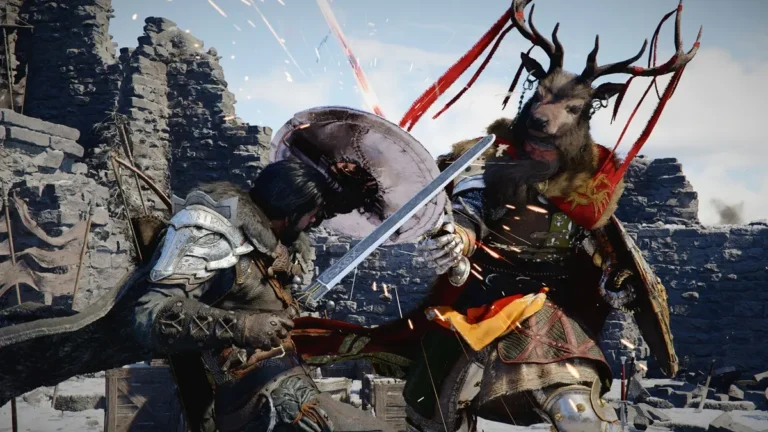
The launch of Crimson Desert is almost here, and excitement around Pearl Abyss’ open-world RPG is reaching a peak. The massive action adventure is set to arrive on March 19, 2026, bringing players to the war-torn continent of Pywel for a story-driven journey filled with large-scale battles, exploration, and cinematic moments.
With a game this large, waiting until launch day to start downloading could mean hours stuck staring at a progress bar. Thankfully, Pearl Abyss is allowing players to download the game ahead of time through the Crimson Desert preload feature. Preloading lets you install the full game before release so you can jump in the moment the servers go live.
If you already pre-ordered the game, this Crimson Desert preload guide explains when the download begins and how to preload Crimson Desert on PC, PlayStation 5, and Xbox Series X|S.
Crimson Desert Preload Date and Global Start Time
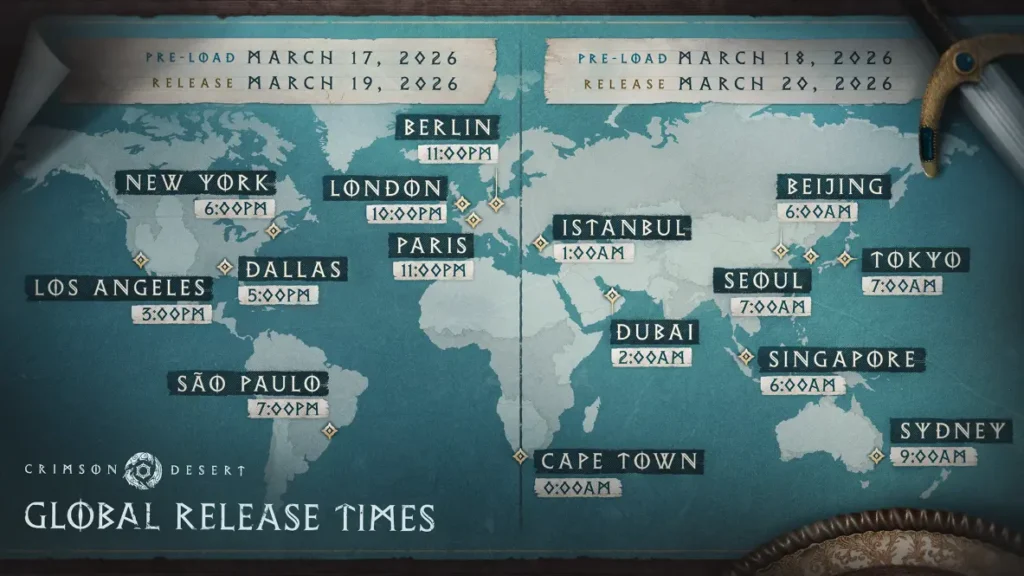
Image via Pearl Abyss.
The Crimson Desert preload officially begins on March 17, 2026 at 10:00 PM UTC. That is roughly 48 hours before the game launches worldwide on March 19.
Because the preload activates at the same global moment, the local time varies depending on your region.
Here are some key local preload times:
| Region | Local Preload Time |
| Los Angeles (PT) | March 17 – 3:00 PM |
| Chicago (CT) | March 17 – 5:00 PM |
| New York (ET) | March 17 – 6:00 PM |
| London (GMT) | March 17 – 10:00 PM |
| Berlin / Paris | March 17 – 11:00 PM |
| Dubai | March 18 – 2:00 AM |
| India (IST) | March 18 – 3:30 AM |
| Beijing / Singapore | March 18 – 6:00 AM |
| Tokyo / Seoul | March 18 – 7:00 AM |
| Sydney | March 18 – 9:00 AM |
Once the Crimson Desert preload becomes available, players who pre-ordered the game will see the download option appear automatically in their platform library.
Crimson Desert Preload Size and Storage Requirements
Image via Pearl Abyss.
Before starting the download, players should make sure they have enough storage space available.
The expected Crimson Desert preload size varies slightly depending on the platform.
| Platform | Estimated File Size |
| PC | ~135 GB |
| PS5 | ~120 GB (estimated) |
| Xbox Series X | ~120 GB (estimated) |
Store listings indicate that the PC version requires around 135 GB of storage, while early console builds suggest installs close to 120 GB.
Physical disc buyers may still need to download a significant update. Reports suggest the disc includes roughly 77 GB of data, with a 48 GB patch required to play, meaning a full install can reach about 125 GB.
Because of the large Crimson Desert preload size, starting the download as early as possible is recommended.
How to Preload Crimson Desert on PC
Players who purchased the game on Steam or Epic Games Store can start downloading as soon as preloading opens.
Follow these steps if you want to know how to preload Crimson Desert on PC:
- Open Steam or the Epic Games Store.
- Go to the Crimson Desert store page.
- Make sure the game has already been pre-ordered.
- When the preload window begins, open your Library.
- Click Install or Download to begin the preload.
Once the download finishes, the game will remain locked until launch time.
How to Preload Crimson Desert on PS5
PlayStation players will receive the preload through the PlayStation Store.
Steps for how to preload Crimson Desert on PS5:
- Open the PlayStation Store.
- Pre-order Crimson Desert if you have not already.
- When preloading starts, go to your Game Library.
- Select Crimson Desert.
- Choose Download.
If automatic downloads are enabled in your console settings, the game may begin installing on its own.
How to Preload Crimson Desert on Xbox Series X|S
Xbox users can access the preload through the Microsoft Store.
Steps to follow:
- Open the Xbox Store.
- Search for Crimson Desert.
- Pre-order the game if needed.
- Once the preload becomes available, open My Games & Apps.
- Select the game and start the Download.
The process is similar to other Xbox preloads and allows the full game to be installed before launch.
Why Preloading Crimson Desert Is Important
Modern open-world games are massive, and Crimson Desert is no exception. The large Crimson Desert preload size means the download could take several hours depending on your internet speed.
By installing the game early, players avoid:
- Launch-day download queues
- Slow servers caused by heavy traffic
- Long installation times
Preloading ensures the game is already installed so that when the servers unlock globally, you can immediately jump into Pywel and begin your adventure.
With millions of players expected to start playing on day one, using the Crimson Desert preload feature is easily the best way to avoid missing the opening hours of the game.
Editor Recommendation’s: